Candidate Management
LightningHire provides powerful tools for managing candidate information, tracking resumes, and evaluating candidate fit for specific jobs.
Overview
The Candidate Management module allows you to:
- Create and manage candidate profiles
- Upload and parse resumes
- Track candidate status and information
- Search and filter candidates based on various criteria
- Evaluate candidates against specific job requirements
Candidate Dashboard
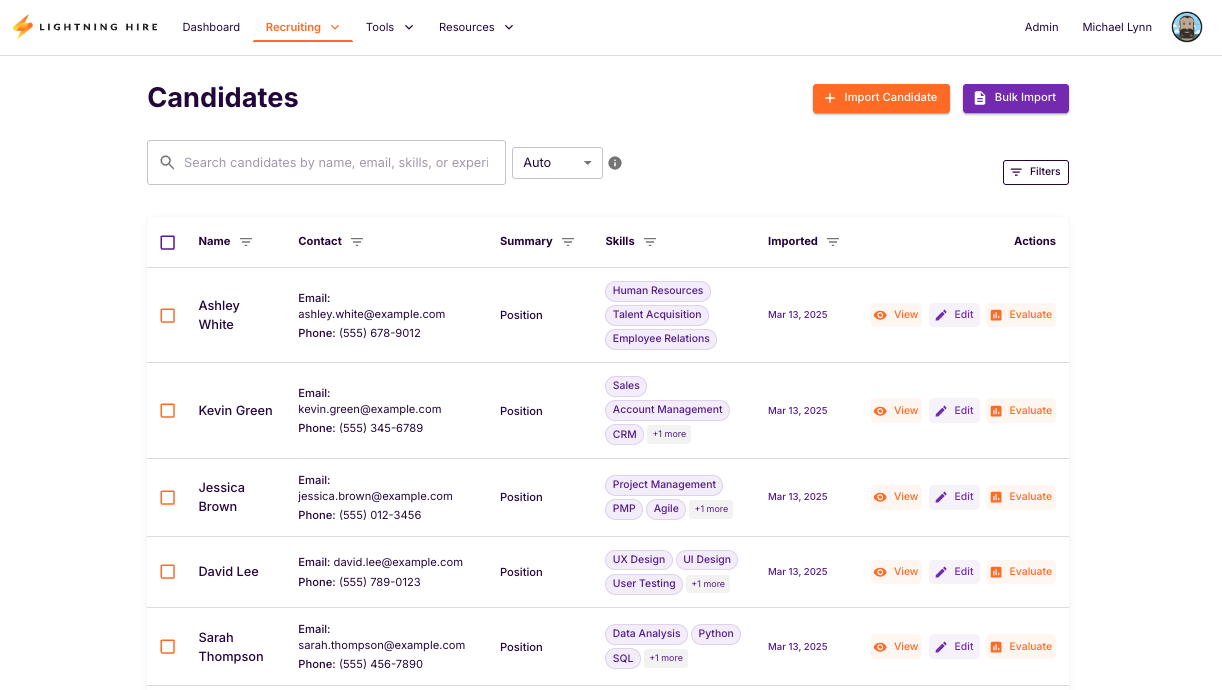
The Candidate Dashboard is your central hub for managing all candidate information. Here you can:
- View a list of all candidates in your system
- See key information like name, skills, and experience level
- Filter and sort candidates based on various criteria
- Access candidate details and resume information
Resume Freshness
LightningHire includes a sophisticated resume freshness tracking system that helps you identify candidates with outdated information.
| Freshness Level | Description | Action Recommended |
|---|---|---|
| Fresh | Resume updated within last 90 days | No action needed |
| Stale | Resume updated 90-180 days ago | Consider requesting an update |
| Outdated | Resume older than 180 days | Request updated resume |
warning
Outdated resumes may contain skills and experience information that is no longer accurate, which can affect matching results.
Enhanced Resume Parsing
LightningHire utilizes advanced resume parsing technology to extract relevant information from candidate resumes.
The resume parsing process includes:
- Document extraction from various formats (PDF, DOCX, etc.)
- Natural language processing to identify key information
- Skills extraction and normalization
- Experience and education parsing
- Contact information extraction
- LLM enrichment for additional insights
- Vector embedding generation for semantic search
Next Steps
- Learn how to add candidates to your LightningHire system
- Explore ways to manage existing candidates
- Discover advanced candidate searching techniques